Free AWS Security Auditing with Service Screener
Summary: Not every team can afford a full AWS security stack (Security Hub + GuardDuty + Inspector) right away — in budget or engineering effort. AWS Service Screener is a free, open-source tool that audits your account against best practices in minutes, and it's a practical way to get a baseline in the meantime. This case study is a practical guide to using it, plus a real engagement where I triaged 860+ findings into 8 remediation workstreams and used a re-scan to check the fixes actually landed.
(open-source)
on a real account
audit report
workstreams
Technology
My Contribution
Ran the audit, built a repeatable triage workflow around the raw output, grouped 860+ findings into 8 workstreams, verified findings against live evidence to avoid outage-causing false positives, and proved remediation with a baseline diff.
What is Service Screener?
Service Screener is an open-source Python tool maintained by AWS Samples. It uses your existing AWS CLI credentials to make read-only describe/list/get API calls across your account, evaluates the results against a library of best-practice checks (security, cost, reliability, performance, operations), and generates an HTML report plus raw data you can post-process.
Think of it as a point-in-time audit rather than continuous monitoring. It answers one question fast: "If I look at my account right now, where am I drifting from best practices?"
Where it fits vs. the managed stack:
| Approach | Cost | Setup effort | Best for |
|---|---|---|---|
| Security Hub + GuardDuty + Inspector | $$$ (per-resource / per-event) | High, ongoing | Mature orgs, compliance mandates |
| Service Screener | Free | Low, run on demand | Startups, SMBs, first audits, periodic reviews |
Service Screener isn't a replacement for GuardDuty-style threat detection. I found it useful as a first step: get a baseline, fix the obvious gaps, then decide whether the managed stack is worth it.
Getting started
Prerequisites: AWS CLI v2 with a read-capable profile (the SecurityAudit or ViewOnlyAccess AWS-managed policy is a good fit), Python 3.9+. Read-only is enough — Service Screener never modifies resources.
Technical detail: install & run For engineers
Install:
git clone https://github.com/aws-samples/service-screener-v2.git
cd service-screener-v2
pip install -r requirements.txt
Run — simplest (default profile / region):
python3 main.py
Run — scoped to regions, services, and a named profile:
python3 main.py --regions ap-northeast-1,us-east-1 \
                --services iam,s3,cloudtrail,kms \
                --profile my-audit-profile
| Flag | Purpose |
|---|---|
--regions | Comma-separated list; omit to scan the profile's default region |
--services | Limit to specific services (faster, focused scans) |
--profile | Use a named AWS CLI profile |
--beta 1 | Enable beta/experimental checks |
Reading the output
After a run, Service Screener drops an output folder containing an index.html report (open in a browser — findings grouped by service, each with severity and a "why it matters" note) plus raw JSON/CSV per service you can parse for your own tooling. That raw data is what makes triage-at-scale possible.
Each finding carries a category mapping roughly to the AWS Well-Architected pillars:
| Code | Meaning |
|---|---|
S | Security |
R | Reliability |
O | Operational Excellence |
C | Cost |
P | Performance |
A typical high-value finding: "IAM user has an access key not rotated in 90+ days" (Security), or "CloudTrail trail does not have S3 bucket logging enabled" (Reliability/Security).
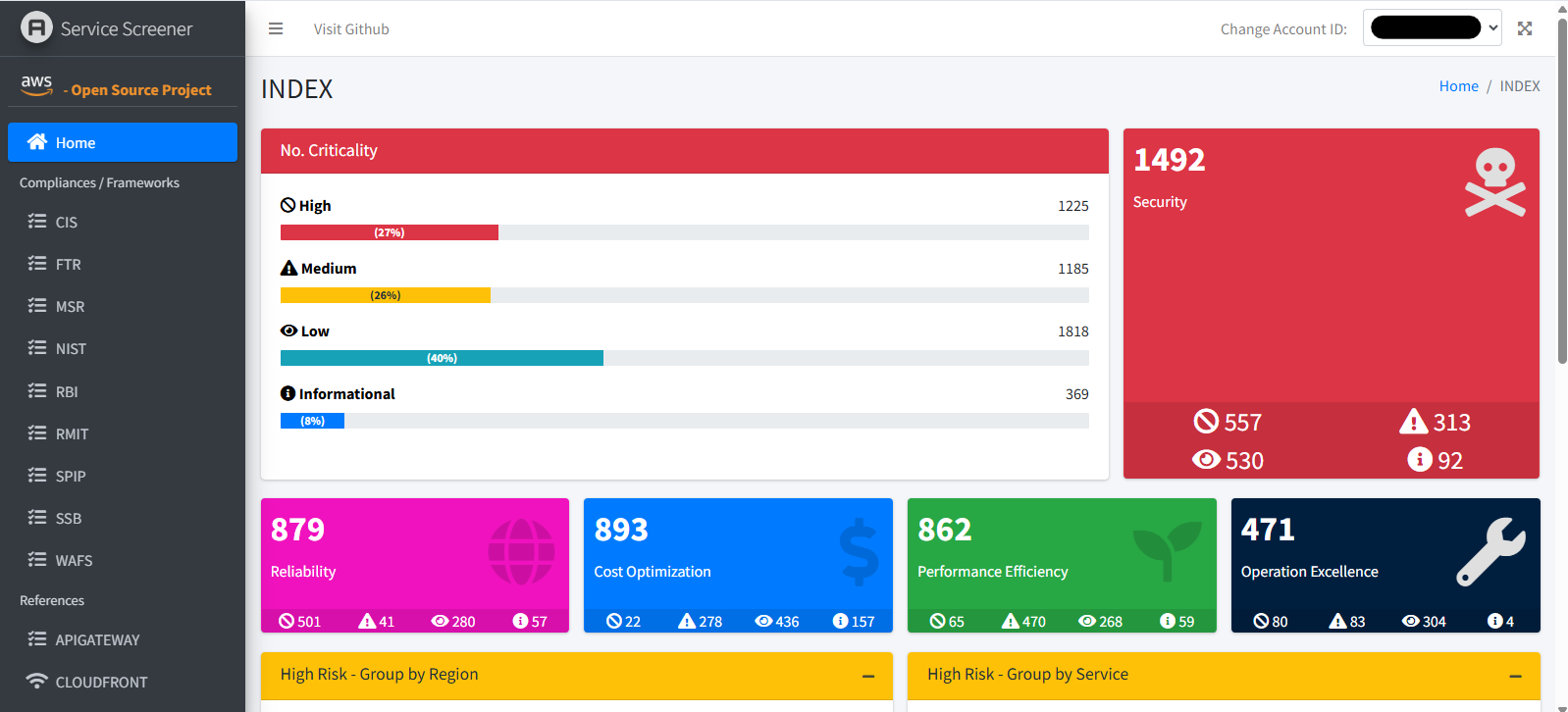
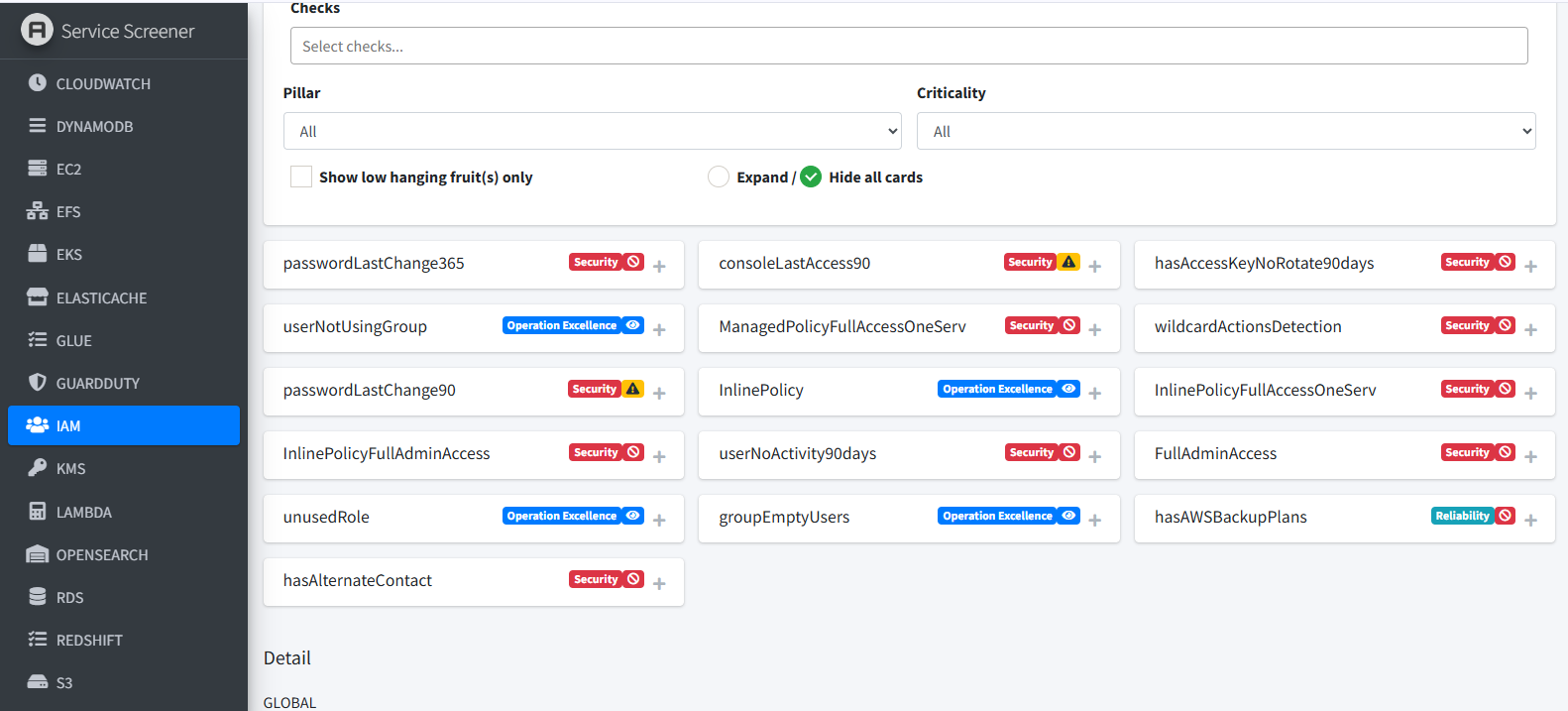
wildcardActionsDetection and FullAdminAccess to hasAccessKeyNoRotate90days.How to triage the report (the part most people skip)
The tool gives you findings. It does not tell you which ones are real risks in your context — that judgment is yours. A practical triage loop:
- Sort by severity, then by blast radius. A wildcard IAM policy on a production deploy role outranks a missing tag.
- Separate "true gaps" from "accepted risk." Some findings are intentional. Document why, don't just silence them.
- Cross-check before acting. Service Screener flags patterns, not intent. A snapshot flagged "orphaned" might still back a live AMI. Verify before you delete.
- Track state over time. Re-run after fixes and diff against the previous scan to prove findings actually closed.
That last point — treating the scan as a baseline you drive down over time — is what turns a one-off report into a security program.
The workflow that ties it together
Reading the HTML report is only step one. What worked for me was building a repeatable loop around the raw output, so a scan turns into a plan and the plan into trackable progress. This is roughly the workflow I've settled on:
Scan & export
Service Screener — read-only, safe on productionScope & verify
Turn noise into a work planRemediate & re-scan
Fix in priority order, prove it landedThe scope-and-verify step is the one that mattered most — it's what turns a flat list of findings into a prioritized, verifiable work plan. The real engagement below shows the loop in practice.
Context
- Environment: a single AWS account hosting multiple projects (production + staging), primarily in one region, with global IAM.
- Starting point: no managed security stack, no periodic audit, security posture unknown — the classic "we've been shipping fast, we're not sure what's exposed" situation.
- Goal: get a full picture of the security gaps for free, prioritize them, and drive them down with proof — without disrupting running production systems.
The team didn't have budget approval for the managed stack, and standing that up would have taken weeks before producing a single actionable finding. Service Screener produced a full, prioritized report on day one, for free — so we started fixing instead of procuring.
Case anonymized — client identifiers and specific resource names are hidden.
The findings: 860+ issues, grouped into 8 workstreams
Running the workflow above on this account, the scope-and-verify step was where most of the work went. The raw scan surfaced thousands of findings across all severities (as the report overview above shows). Instead of trying to fix everything at once, we focused on the 860+ High-severity items and grouped them into eight remediation workstreams. The lower-severity findings were logged for later, not acted on first.
The breakdown, organized by remediation scope:
| # | Scope | Total | Passed after fix | Still open |
|---|---|---|---|---|
| 01 | S3 / IAM logging expansion | 5 | 0 | 0 |
| 02 | Disable stale IAM keys/users | 19 | 11 | 0 |
| 03 | Wildcard (*) policy cleanup | 145 | 54 | 53 |
| 04 | Remove Full Access / Admin | 8 | 2 | 5 |
| 05 | S3 service policy cleanup | 38 | 2 | 28 |
| 06 | CloudWatch / SNS alarms | 66 | 2 | 64 |
| 07 | EBS & RDS backup protection | 576 | 97 | 479 |
| 08 | Tighten KMS key policies | 3 | 0 | 3 |

Two buckets stood out, both typical of a team that has been shipping quickly:
- Backup protection (576 findings) — the largest by volume. Root volumes without backup plans, RDS without deletion protection. High count, but mostly mechanical to fix once a backup policy is defined.
- Wildcard IAM policies (145 findings) — the largest by risk. Roles and groups carrying
iam:*,ec2:*,s3:*and AWS-managed FullAccess policies. This is where least-privilege work concentrated.
What I learned: the tool flags patterns, not intent
The thing that stuck with me from this engagement wasn't a vulnerability — it was a false positive I could easily have acted on, which would have caused an outage.
- IAM roles flagged "too permissive": Service Screener flagged dozens of EC2 instance roles carrying
AmazonSSMManagedInstanceCoreand similar as "Managed Policy Full Access." Some did need narrowing — but many were correctly attached to running services. Stripping them would have broken SSM access to production instances. - Wildcard on deploy pipelines: the
code-pipeline-role-*roles carried broad wildcards (ec2:*, s3:*, cloudformation:*...). Real risk — but these drive active CI/CD. Narrowing them required mapping every action the pipeline actually uses before touching the policy, or deployments would silently fail.
Proving the fixes landed: baseline diff
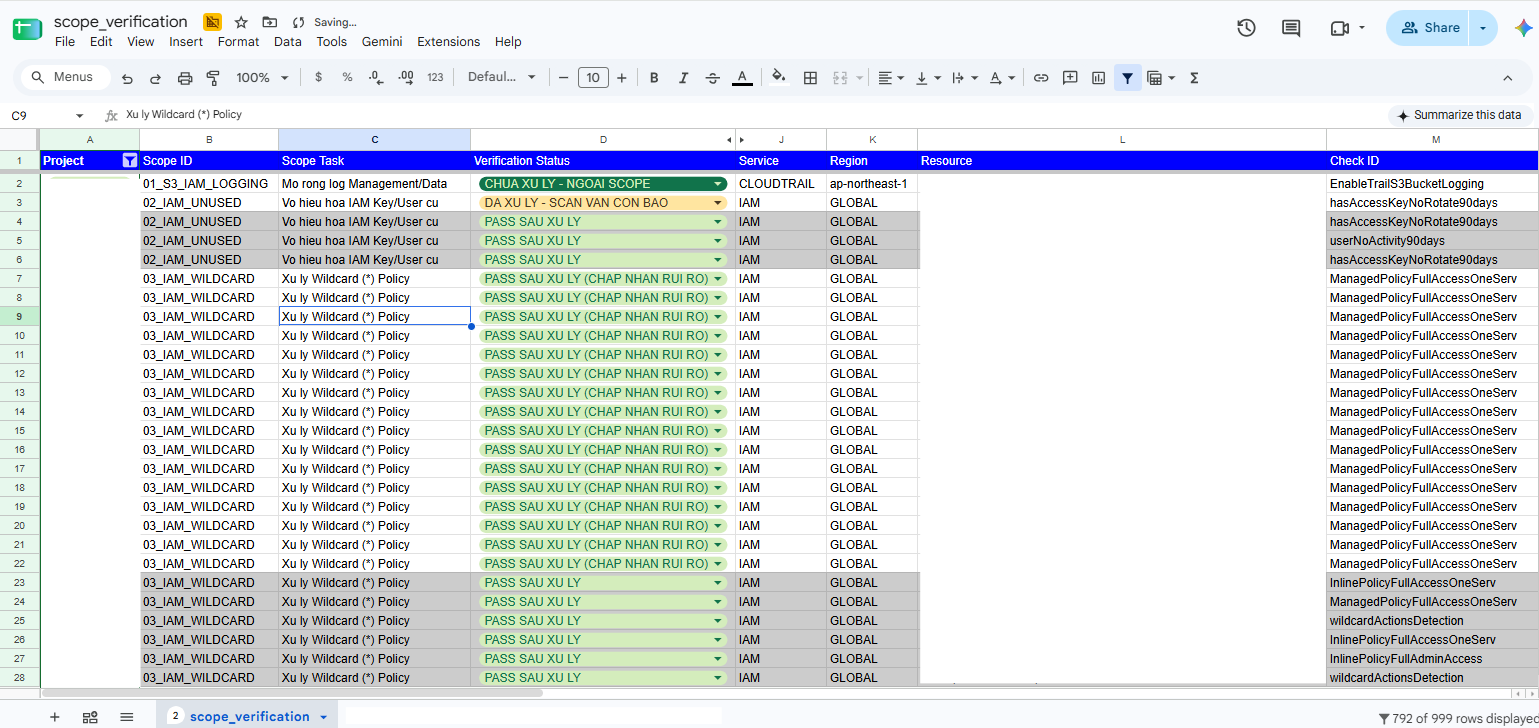
A scan is a snapshot. To prove remediation actually worked, I ran a second scan months later and diffed it against the baseline. Findings that disappeared were marked "PASS after fix" and tied back to the specific date-stamped comparison — for example, 11 of 19 stale IAM key/user findings and 54 of 145 wildcard findings were confirmed closed by the re-scan, not just assumed fixed.
Having that before/after comparison is what made the difference between running a scan once and being able to show the fixes actually held.
Results
| Metric | Value |
|---|---|
| Total findings surfaced | 860+ |
| Cost of the tooling | $0 |
| Time to first full report | < 1 day |
| Remediation workstreams defined | 8 |
| Findings confirmed closed (baseline diff) | 160+ and counting |
| Highest-risk category | Wildcard IAM / Full Access policies |
| Highest-volume category | EBS/RDS backup protection (576) |
What Service Screener is good at — and where it stops
Great at: zero-cost, fast, broad best-practice coverage; read-only and safe on production; raw output you can post-process for triage at scale; a perfect first step before deciding on a paid security stack.
Not a fit for: continuous/real-time threat detection (that's GuardDuty); runtime vulnerability scanning (that's Inspector); findings correlation and long-term case management (that's Security Hub + Detective); anything that needs intent — it flags patterns, you supply judgment.
Lessons learned
- Free tooling gets you a baseline fast — worth doing while the paid stack waits for budget.
- Raw output > the HTML report — parsing findings into workstreams turns 860+ rows into a plan.
- The scanner proposes, the human decides — verifying against live evidence prevented an outage.
- A scan is just a snapshot — re-scanning and comparing is what shows the fixes held.
- Know where the free tool stops — it's the first step, not the whole security posture.
Need an AWS security audit?
I help teams run AWS security audits and remediation — from a free Service Screener baseline to a full least-privilege and backup-protection program, without disrupting production.
Get in touch